# ER Digram
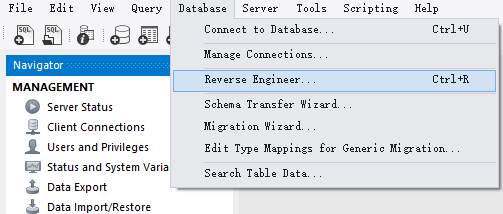
MySQL Workbench 可以生成数据表的 Entity RelationShip Digram. Menu Path: Database -> Reverse Engineer -> 选择相关 Database 生成 Model Digram.
如下是 sql_store 的 ER Digram.
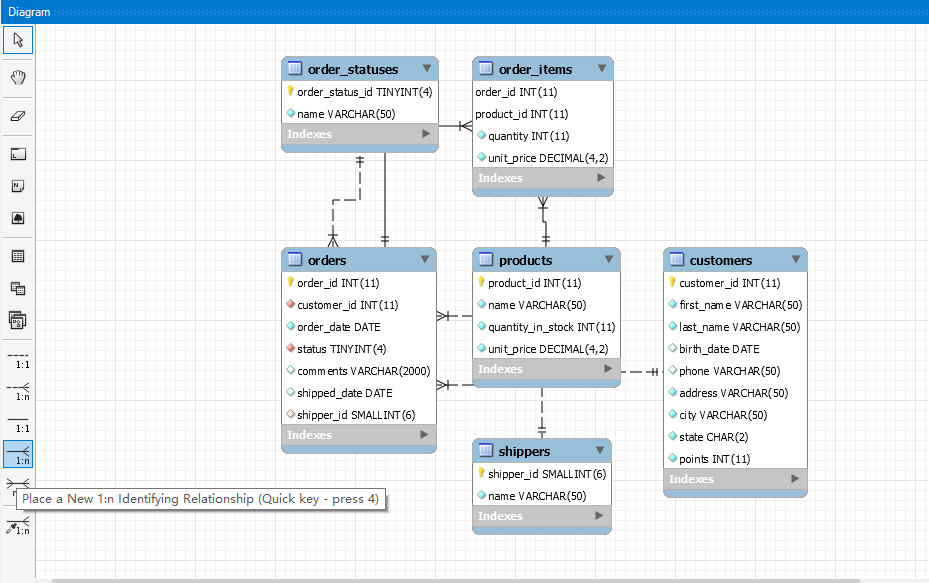
notes: Identifying relationships exist when the primary key of the parent entity is included in the primary key of the child entity. On the other hand, a non-identifying relationship exists when the primary key of the parent entity is included in the child entity but not as part of the child entity’s primary key.
当父实体的主键包含在子实体的主键中时,存在标识关系。另一方面,如果父实体的主键包含在子实体中,但不作为子实体的主键的一部分,则存在非标识关系。
# Notes
# All clauses other than Select are optional
Select 以外的子句都是可选的
1 | select 1, 2; |
# Field values are case insensitive by default
栏位值默认不区分大小写
1 | select * from customers where state = 'va'; |
| customer_id | first_name | last_name | birth_date | phone | address | city | state | points |
|---|---|---|---|---|---|---|---|---|
| 2 | Ines | Brushfield | 1986-04-13 | 804-427-9456 | 14187 Commercial Trail | Hampton | VA | 947 |
# Default Date Format %Y-%m-%d
1 | select * |
# Varchar vs Char
name varchar (50) 如果 name 只有 5 个字符那么 varchar (50) 只使用 5 个字符,不会浪费空间;
name char (50) 如果 name 只有 5 个字符会插入 45 个空白字符填满到 50 个字符。
# Default
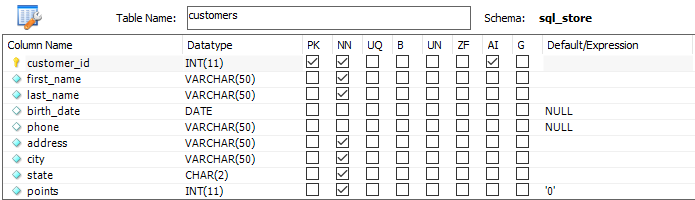
default 表示让 mysql 生成这个值,可以用于主键自增栏位和有默认值的栏位
1 | insert into customers |
# Insert Multi Rows
1 | insert into shippers (name) |
# Insert Multi Tables
1 | insert into orders (customer_id, order_date, status) |
# Regexp
查询 last_name 包含 field|mac|rose 的数据
1 | select * |
查询 last_name 包含 ge|ie|me 的数据
1 | select * |
查询 last_name 以 b 开头且包含 ge|ie|me 的数据
1 | select * |
# Limit
跳过前 6 条记录,然后获取 3 条记录
1 | select * |
# Order
默认状态下 group by 会按照其指定的列排序会影响性能,所以查询或 view 中应尽量避免使用 group by
1 | select client_id, sum(invoice_total) as total_sales |
| client_id | total_sales |
|---|---|
| 1 | 802.89 |
| 2 | 101.79 |
| 3 | 705.90 |
| 5 | 980.02 |
# Aggregate Function
1 | use sql_invoicing; |
| invoice_id | number | client_id | invoice_total | payment_total | invoice_date | due_date | payment_date |
|---|---|---|---|---|---|---|---|
| 1 | 91-953-3396 | 2 | 101.79 | 0.00 | 2019-03-09 | 2019-03-29 | |
| 2 | 03-898-6735 | 5 | 175.32 | 8.18 | 2019-06-11 | 2019-07-01 | 2019-02-12 |
| 3 | 20-228-0335 | 5 | 147.99 | 0.00 | 2019-07-31 | 2019-08-20 | |
| 4 | 56-934-0748 | 3 | 152.21 | 0.00 | 2019-03-08 | 2019-03-28 | |
| 5 | 87-052-3121 | 5 | 169.36 | 0.00 | 2019-07-18 | 2019-08-07 | |
| 6 | 75-587-6626 | 1 | 157.78 | 74.55 | 2019-01-29 | 2019-02-18 | 2019-01-03 |
| 7 | 68-093-9863 | 3 | 133.87 | 0.00 | 2019-09-04 | 2019-09-24 | |
| 8 | 78-145-1093 | 1 | 189.12 | 0.00 | 2019-05-20 | 2019-06-09 | |
| 9 | 77-593-0081 | 5 | 172.17 | 0.00 | 2019-07-09 | 2019-07-29 | |
| 10 | 48-266-1517 | 1 | 159.50 | 0.00 | 2019-06-30 | 2019-07-20 | |
| 11 | 20-848-0181 | 3 | 126.15 | 0.03 | 2019-01-07 | 2019-01-27 | 2019-01-11 |
| 13 | 41-666-1035 | 5 | 135.01 | 87.44 | 2019-06-25 | 2019-07-15 | 2019-01-26 |
| 15 | 55-105-9605 | 3 | 167.29 | 80.31 | 2019-11-25 | 2019-12-15 | 2019-01-15 |
| 16 | 10-451-8824 | 1 | 162.02 | 0.00 | 2019-03-30 | 2019-04-19 | |
| 17 | 33-615-4694 | 3 | 126.38 | 68.10 | 2019-07-30 | 2019-08-19 | 2019-01-15 |
| 18 | 52-269-9803 | 5 | 180.17 | 42.77 | 2019-05-23 | 2019-06-12 | 2019-01-08 |
| 19 | 83-559-4105 | 1 | 134.47 | 0.00 | 2019-11-23 | 2019-12-13 |
# max, avg, sum, count
max, min, avg, sum, count 等聚合函数会忽略 null 的记录,聚合栏位前添加 distinct 可以排除重复记录
1 | select max(invoice_total) as highest, |
| highest | lowest | average | total | number_of_invoices | number_of_payments | total_records | number_of_clients | number_of_distinct_clients |
|---|---|---|---|---|---|---|---|---|
| 189.12 | 101.79 | 152.388235 | 2590.60 | 17 | 7 | 17 | 17 | 4 |
# rollup
根据 group by 栏位分层归纳汇总
1 | select client_id, |
| client_id | total_sales |
|---|---|
| 1 | 802.89 |
| 2 | 101.79 |
| 3 | 705.90 |
| 5 | 980.02 |
| 2590.60 |
1 | select state, |
| state | city | total_sales |
|---|---|---|
| CA | San Francisco | 705.90 |
| CA | 705.90 | |
| NY | Syracuse | 802.89 |
| NY | 802.89 | |
| OR | Portland | 980.02 |
| OR | 980.02 | |
| WV | Huntington | 101.79 |
| WV | 101.79 | |
| 2590.60 |
# Common Use Function
# numeric
rand () 返回 0 - 1 之间的随机数
1 | SELECT |
| round(5.73) | round(5.73, 1) | truncate(5.73, 1) | ceiling(5.73) | floor(5.73) | rand() |
|---|---|---|---|---|---|
| 6 | 5.7 | 5.7 | 6 | 5 | 0.27181225481611887 |
# string
1 | select upper('sky') a, lower('Sky') b, |
| a | b | c | d | e | f | g | h | i | j | k | l |
|---|---|---|---|---|---|---|---|---|---|---|---|
| SKY | sky | sky | sky | sky | babb | chen | chen | 6 | 6 | bob chen | babbchen |
# date
1 | select now(), curdate(), curtime(); |
| now() | curdate() | curtime() |
|---|---|---|
| 2020-09-12 16:02:08 | 2020-09-12 | 16:02:08 |
1 | select year(now()), month(now()), day(now()), hour(now()), minute(now()), second(now()); |
| year(now()) | month(now()) | day(now()) | hour(now()) | minute(now()) | second(now()) |
|---|---|---|---|---|---|
| 2020 | 9 | 12 | 16 | 4 | 53 |
extract 也可 b 以用来提取日期的一部分,并且 extract 是 sql 标准的一部分
1 | select extract(year from now()) as year, |
| year | month | day | hour | minute | second |
|---|---|---|---|---|---|
| 2020 | 9 | 12 | 16 | 9 | 27 |
1 | select date_format(now(), '%Y-%m-%d %H:%i %p') as date; |
日期的相关计算
MySQL 在执行查询语句时,会先对 SELECT 子句里的列表进行扫描,并对列进行计算,所以 (select datediff (tomorrow, yesterday)) as datediff 可以正确运行
1 | select date_add(now(), interval 1 day) as tomorrow, |
| tomorrow | yesterday | datediff | secdiff |
|---|---|---|---|
| 2020-09-13 16:35:38 | 2020-09-11 16:35:38 | 2 | -120 |
# null
coalesce 返回多个值中的第一个非 null 值
1 | select ifnull(null, 'unknown') column_a, |
# case
1 | select order_id, |
# View
updateable view
可更新视图是指不包含 distinct,aggregate function (min,max, sum, min, max),group by, having,union 的视图,可以执行 update,insert,delete 操作。通过 view 更新数据可能导致更新后的数据从 view 中删除,可以添加 with check option 子句防止行消失
1 | create or replace view invices_with_balance as |
| invoice_id | number | client_id | invoice_total | payment_total | balance | invoice_date | due_date | payment_date |
|---|---|---|---|---|---|---|---|---|
| 1 | 91-953-3396 | 2 | 101.79 | 0.00 | 101.79 | 2019-03-09 | 2019-03-29 | |
| 2 | 03-898-6735 | 5 | 175.32 | 8.18 | 167.14 | 2019-06-11 | 2019-07-01 | 2019-02-12 |
| … |
执行如下 sql 会 产生 Error Code: 1369. CHECK OPTION failed ‘sql_invoicing.invices_with_balance’, 因为更新之后 invoice_total - payment_total = 0 ,不满足大于 0 的条件会导致 invoice_id = 1 的数据从 view 中移除。
1 | update invices_with_balance |
# Procedure
1 | delimiter $$ |
# Function
1 | delimiter $$ |
# Event
开启 event_scheduler
1 | show variables like 'event%'; |
定义 event
1 | delimiter $$ |
查看 event
1 | show events; |
| DB | Name | Definer | Time zone | Type | Execute at | Interval value | Interval field | Starts | Ends | Status | Originator | character_set_client | collation_connection | Database Collation |
|---|---|---|---|---|---|---|---|---|---|---|---|---|---|---|
| sql_invoicing | yearly_delete_stale_audit_rows | root@localhost | SYSTEM | RECURRING | 1 | YEAR | 2019-01-01 00:00:00 | 2029-01-01 00:00:00 | ENABLED | 1 | utf8mb4 | utf8mb4_0900_ai_ci | utf8_general_ci |
启用禁用 event
1 | alter event yearly_delete_stale_audit_rows disable; |
# Transactions
autocommit
每执行一条语句,MySQL 会将该语句放在事务中,如果没有错误,会自动提交
1 | show variables like 'autocommit'; |
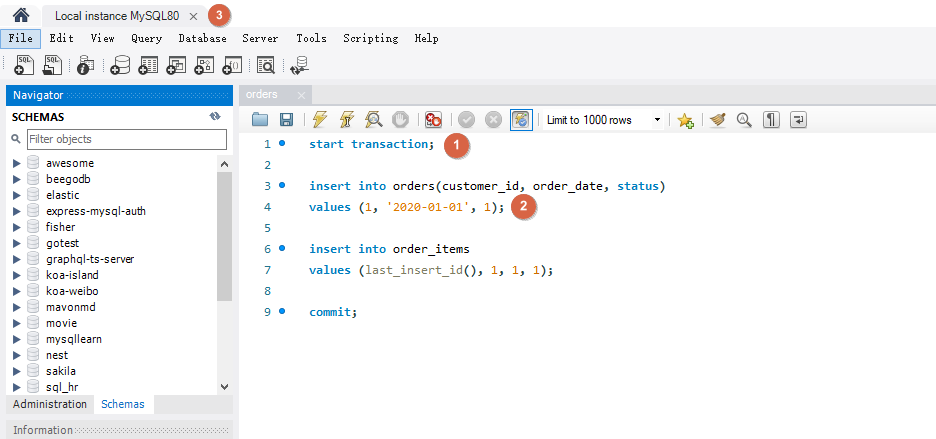
创建 transaction
1 | start transaction; -- 1 |
模拟执行到 insert into order_items 时断开 server 连接。
Workbench 菜单 Query -> Excute Current Statement (Ctrl + Enter) 执行 1, 2, 关闭连接,重新连接查询 orders 数据没有被插入。
# Concurrency and Locking
1 | select * from customers where customer_id = 1; |
| customer_id | first_name | last_name | birth_date | phone | address | city | state | points |
|---|---|---|---|---|---|---|---|---|
| 1 | Babara | MacCaffrey | 1986-03-28 | 781-932-9754 | 0 Sage Terrace | Waltham | MA | 2303 |
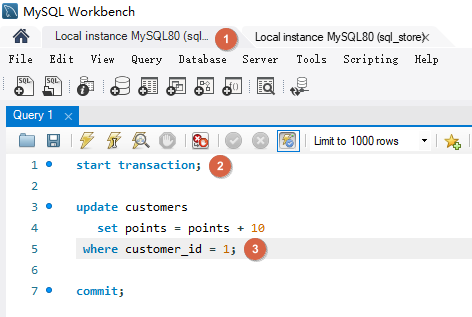
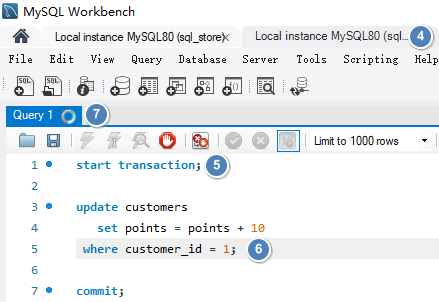
如下在第一个连接中将客户的积分加 10 但是没有提交。在第二个连接中同样执行将客户的积分加 10 的操作,此时会等待第一个连接操作的 commit 或 rollback.
| Connection One | Connection Two |
|---|---|
 |
 |
将第一个操作 commit 之后,第二个也进行 commit, 如下客户 customer_id 为 1 的积分会增加 20。
| customer_id | first_name | last_name | birth_date | phone | address | city | state | points |
|---|---|---|---|---|---|---|---|---|
| 1 | Babara | MacCaffrey | 1986-03-28 | 781-932-9754 | 0 Sage Terrace | Waltham | MA | 2323 |
# Lost Updates
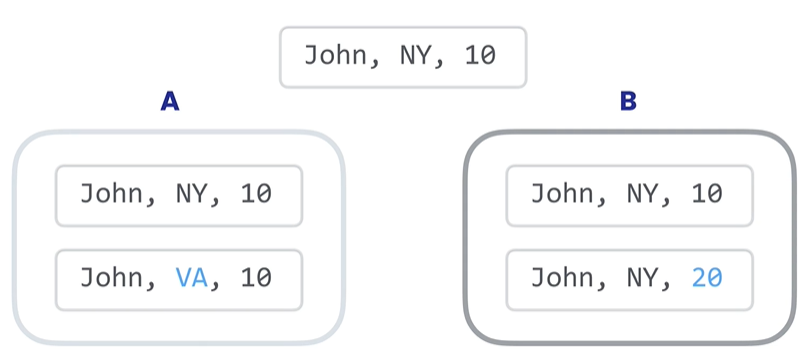
当两个事务尝试更新相同的数据并且没有上锁时,就会发生这种情况,较晚提交的事务会覆盖较早事务做的更改。
如下事务 A 和事务 B 对同一数据修改,如果事务 B 更晚提交就会覆盖事务 A 的提交,事务 A 的更新就会丢失。解决方法是使用锁。默认情况下 MySQL 会使用锁定机制。防止两个事务同时更新同样的数据。它们会一个一个按照顺序执行,这样连个更新都能完成。
# Dirty Reads
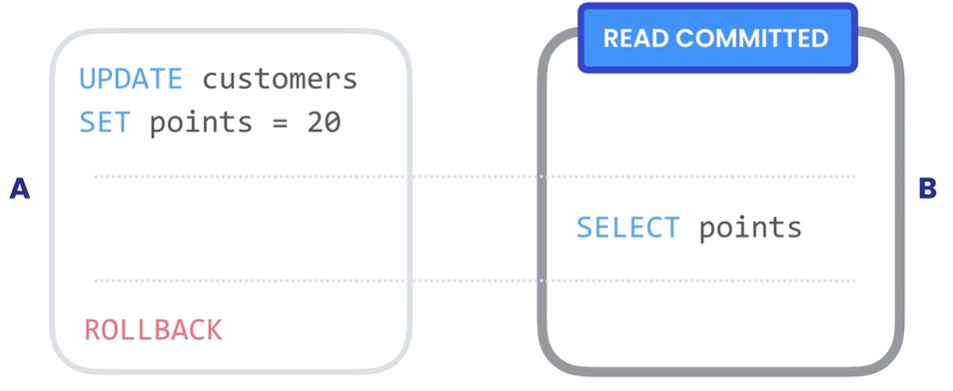
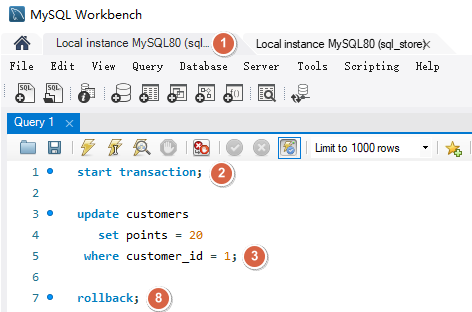
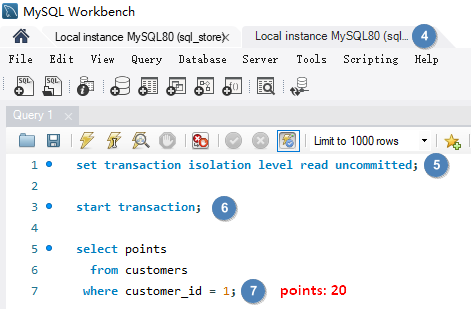
脏读就是一个事务读取了尚未被提交的数据。事务 B 读取了事务 A 尚未提交的数据,并基于数据做了决策(每点积分给予 1% 折扣),但是之后事务 A 又进行了回滚,实际客人没有 20 积分,事务 B 却给了 20 % 折扣。解决此问题需要为事务建立隔离级别 READ COMMITTED,这样事务就只能读取已经提交的数据。
| Connection One | Connection Two |
|---|---|
 |
 |
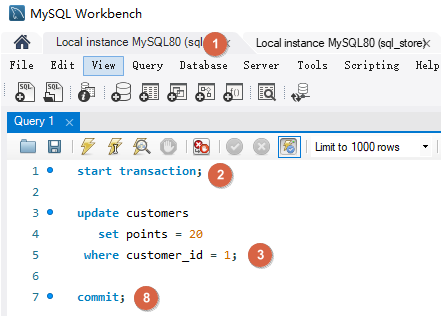
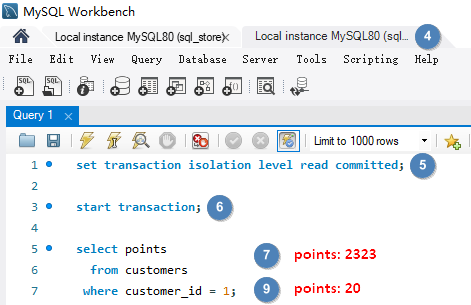
使用隔离级别 READ COMMITTED set transaction isolation level read committed; 解决 Dirty Reads。
| Connection One | Connection Two |
|---|---|
 |
 |
# Non-repeating Reads
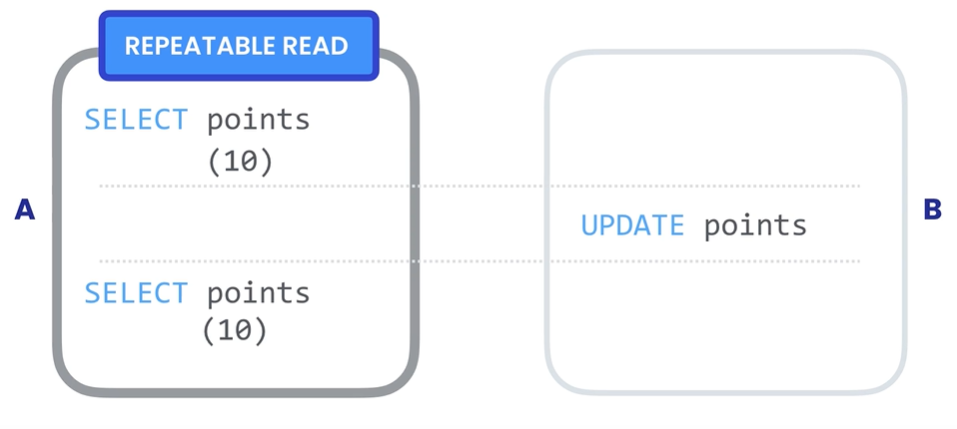
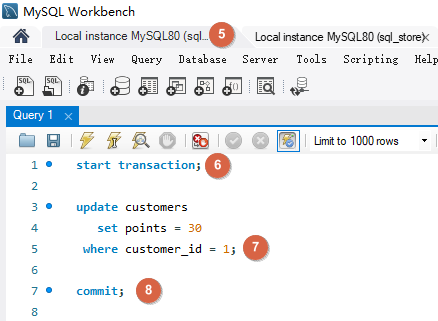
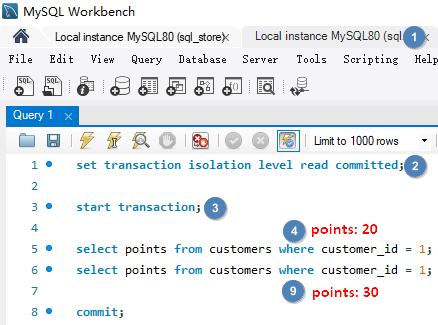
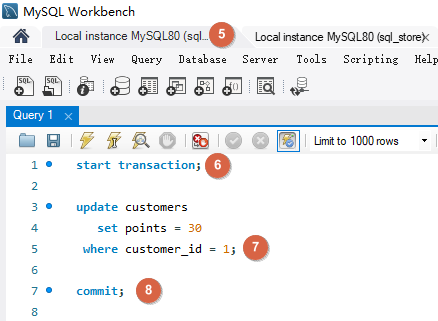
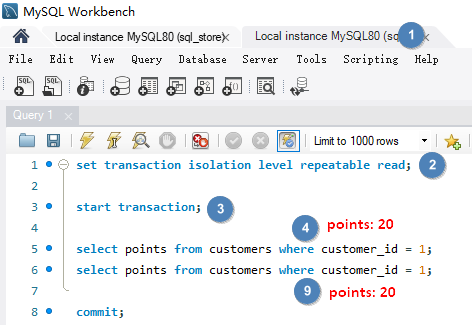
不可重复读就是在事务过程中读取了某个数据两次,得到了不同结果。解决此问题需要为事务建立隔离级别 REPEATABLE READ, 将它与其他事务隔离,确保数据更改对事务不可见,读取的数据是可重复和一致的,即使其它事务更改了数据,我们会看到首次读取就创建的快照。
| Connection One | Connection Two |
|---|---|
 |
 |
使用隔离级别 REPEATABLE READ set transaction isolation level repeatable read 解决 Non-repeating Reads。
| Connection One | Connection Two |
|---|---|
 |
 |
# Phantom Reads
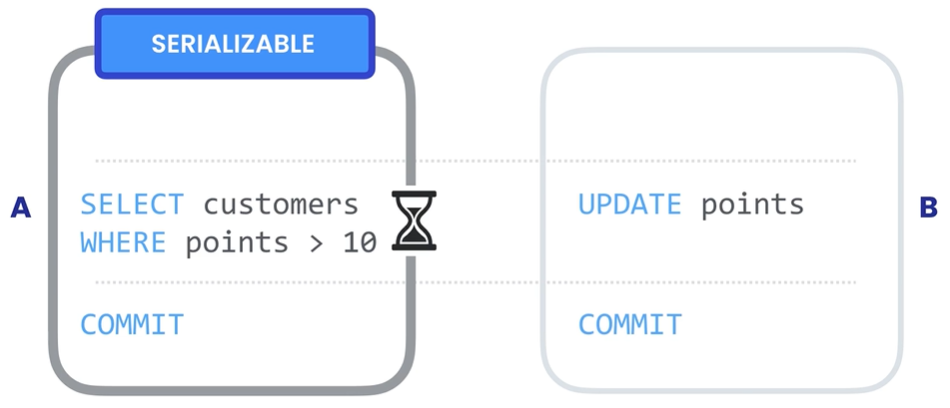
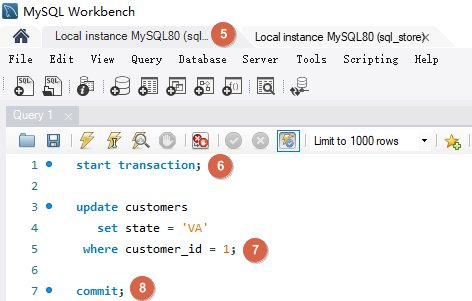
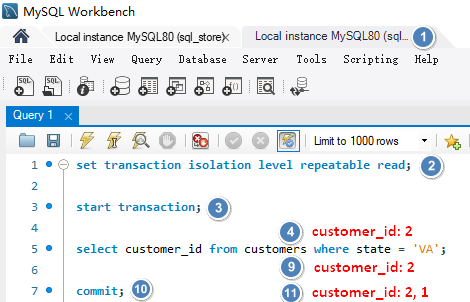
幻读是指在事务执行查询之后进行了添加,更新或删除,实际读取的是添加,更新或删除之前的数据,事务执行完成之后仍然有符合条件的数据,这种突然出现的数据就像幽灵 👻 一样。解决此问题需要为事务建立隔离级别 SERIALIZABLE, 它能保证当有别的事务在更新数据时,我们的事务能够知晓变动,如果有其它事务修改了可能影响查询结果的数据,我们的事务必须等待它们完成。这是事务的最高隔离级别,保证最大的确定性,但是会影响性能。
| Connection One | Connection Two |
|---|---|
 |
 |
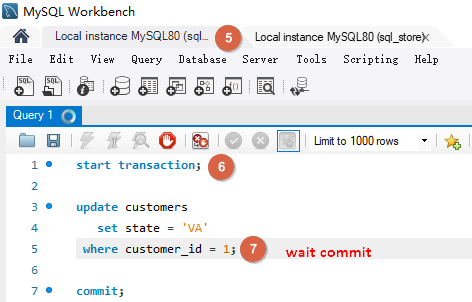
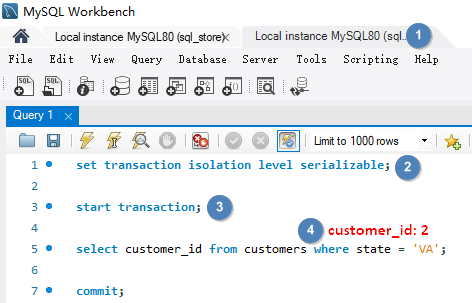
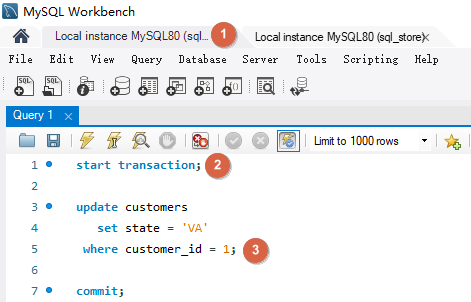
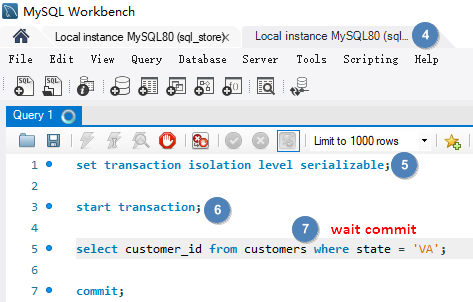
使用隔离级别 SERIALIZABLE set transaction isolation level serializable 解决 Phantom Reads。
| Connection One | Connection Two |
|---|---|
 |
 |
 |
 |
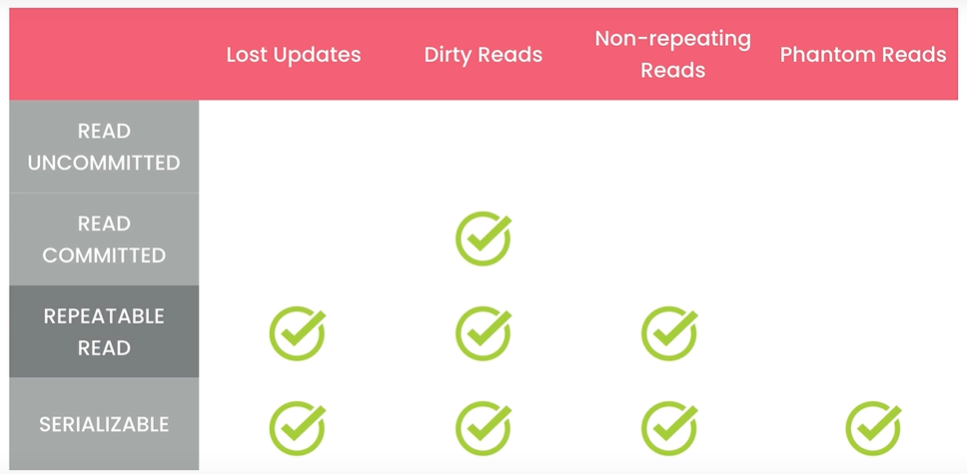
更高的隔离级别意味着更低的并发问题,但同时也意味着更多的锁和过呢更低的并发性能。
MySQL 的默认隔离级别时 REPEATABLE READ
1 | show variables like 'transaction_isolation'; |
# Datatype
# json
json raw string
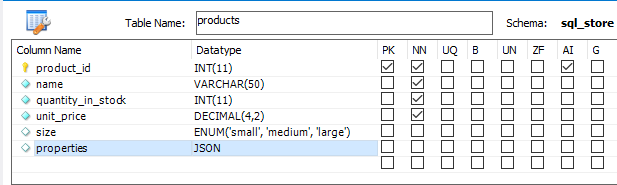
1 | update products set properties = ' |
| product_id | name | quantity_in_stock | unit_price | size | properties |
|---|---|---|---|---|---|
| 1 | Foam Dinner Plate | 70 | 1.21 | small | {“weight”: 10, “dimensions”: [1, 2, 3], “manufactor”: {“name”: “sony”}} |
json_object, json_array
1 | update products set properties = json_object( |
json_extract
1 | select json_extract(properties, '$.weight') as extract_weight, |
| extract_weight | weight | x | y | z | manufactor_in_quotes | manufactor |
|---|---|---|---|---|---|---|
| 10 | 10 | 1 | 2 | 3 | “sony” | sony |
json_set
1 | update products |
json_remove
1 | update products |
# Data Modelling
# conceptual model
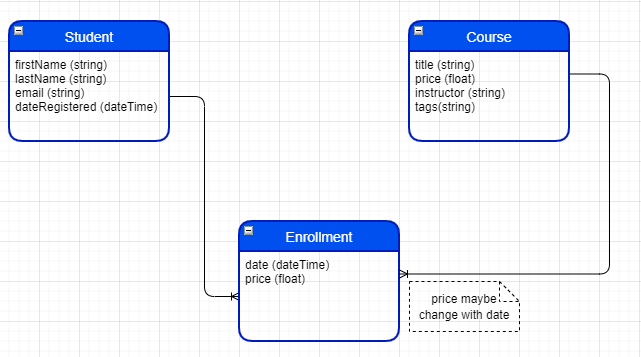
Represents the entities and their relationships. Generally use ER(Entity Relationship) Digram or UML

# logic model
Logic model is independent of database technologics. It’s just an abstract data model that clearly shows our entities. But there’s something more detailed than the conceptual model.
# physic model
File -> New Model
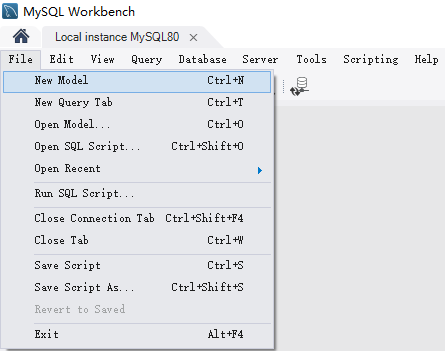
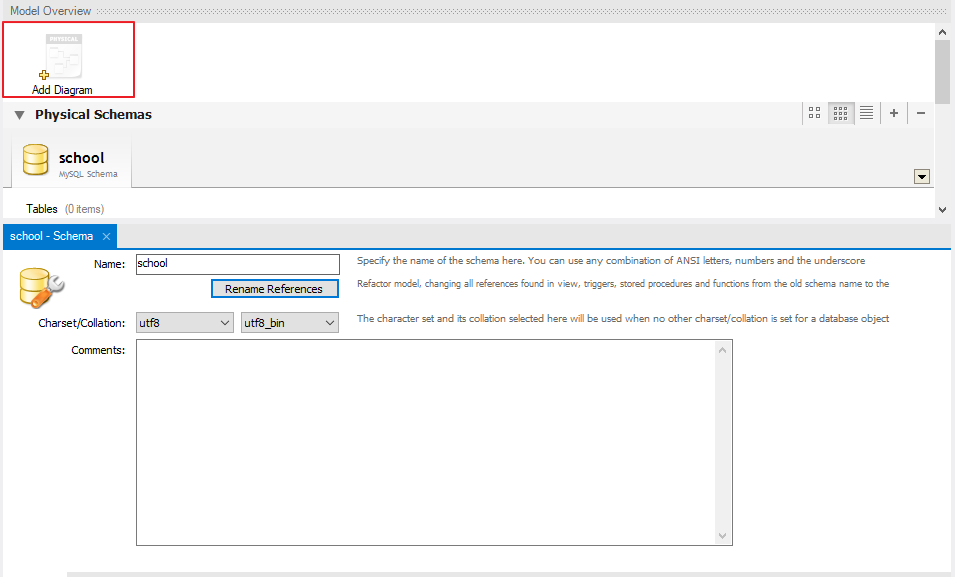
Add Diagram
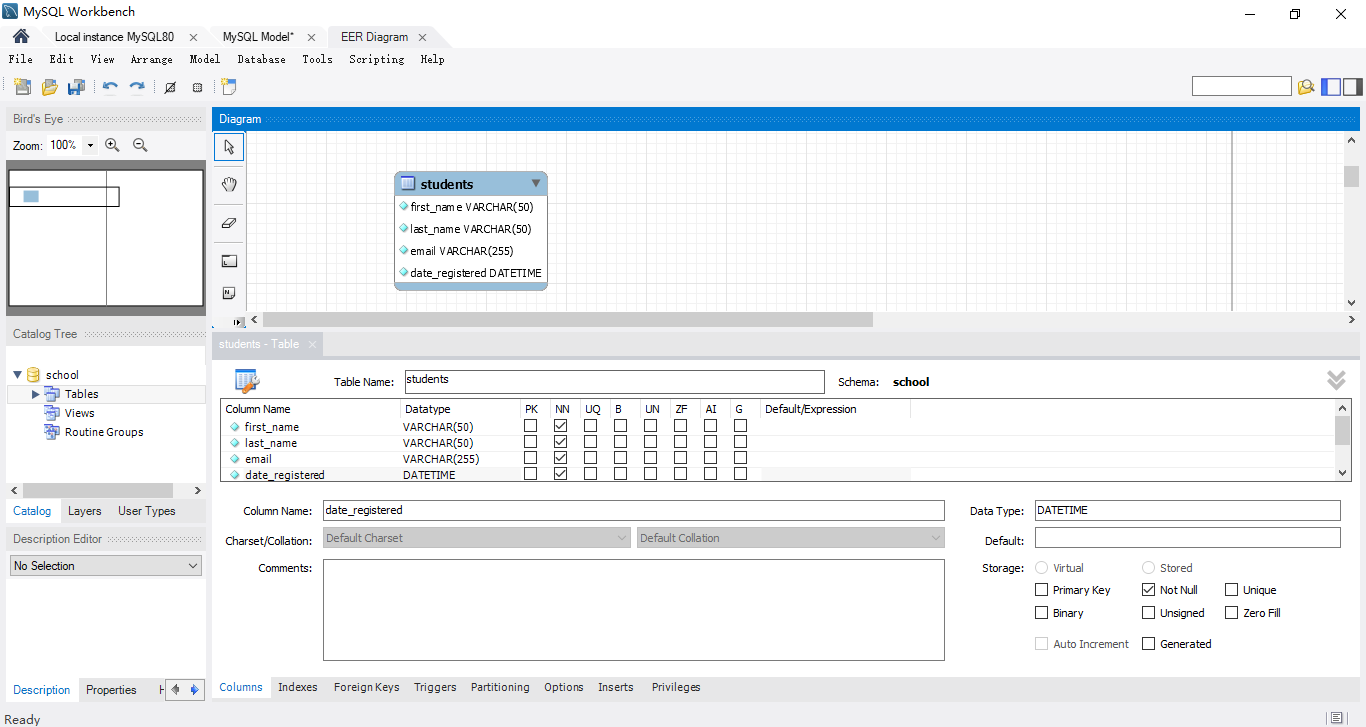
Add Tables and Columns
Add Primary Key, Foreign Key and Relationship
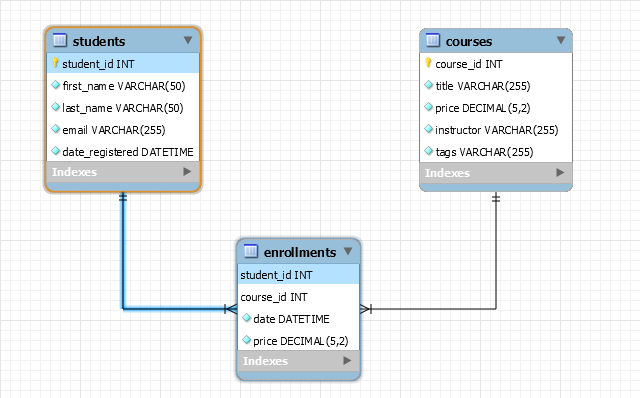
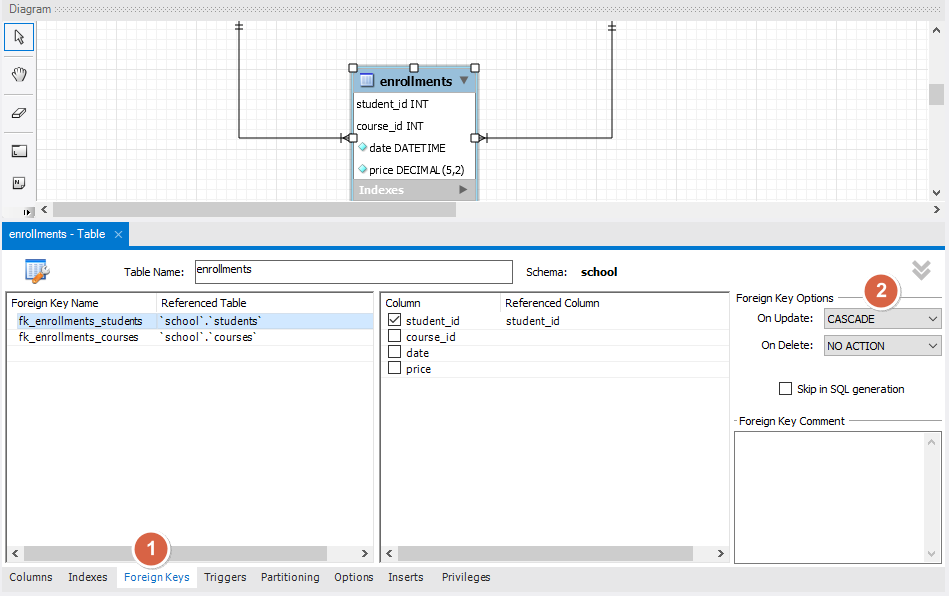
Setting Foreign Key,CASCADE on update, NO ACTION(RESTRICT) on delete (reject delete)